HOW IT WORKS
How Ink works.
Ink is a private memory for your writing. This is what it does with it, and what it never does.
01
The idea.
Ink is a place to write, and a memory for what you have written. You write. Ink keeps it. Later, while you write something new, Ink quietly shows other pieces of yours that are close to it, including ones you forgot and ones in another language.
That is all it does. It never writes for you, and it never tells you what your words are worth.
Ink is a React 19 and Tiptap editor on a Fastify API, with Postgres (Supabase) underneath. A piece is a Yjs document plus two derived copies: a search copy of its words, and a 1,024-number vector of its meaning.
Everything that looks smart is read-only. It ranks pieces that already exist. Nothing in Ink generates or edits text.
As of October 2026. The numbers and settings below are today’s, tuned on small samples, and may change as Ink is tuned or the model is replaced.
02
Saved on your device first.
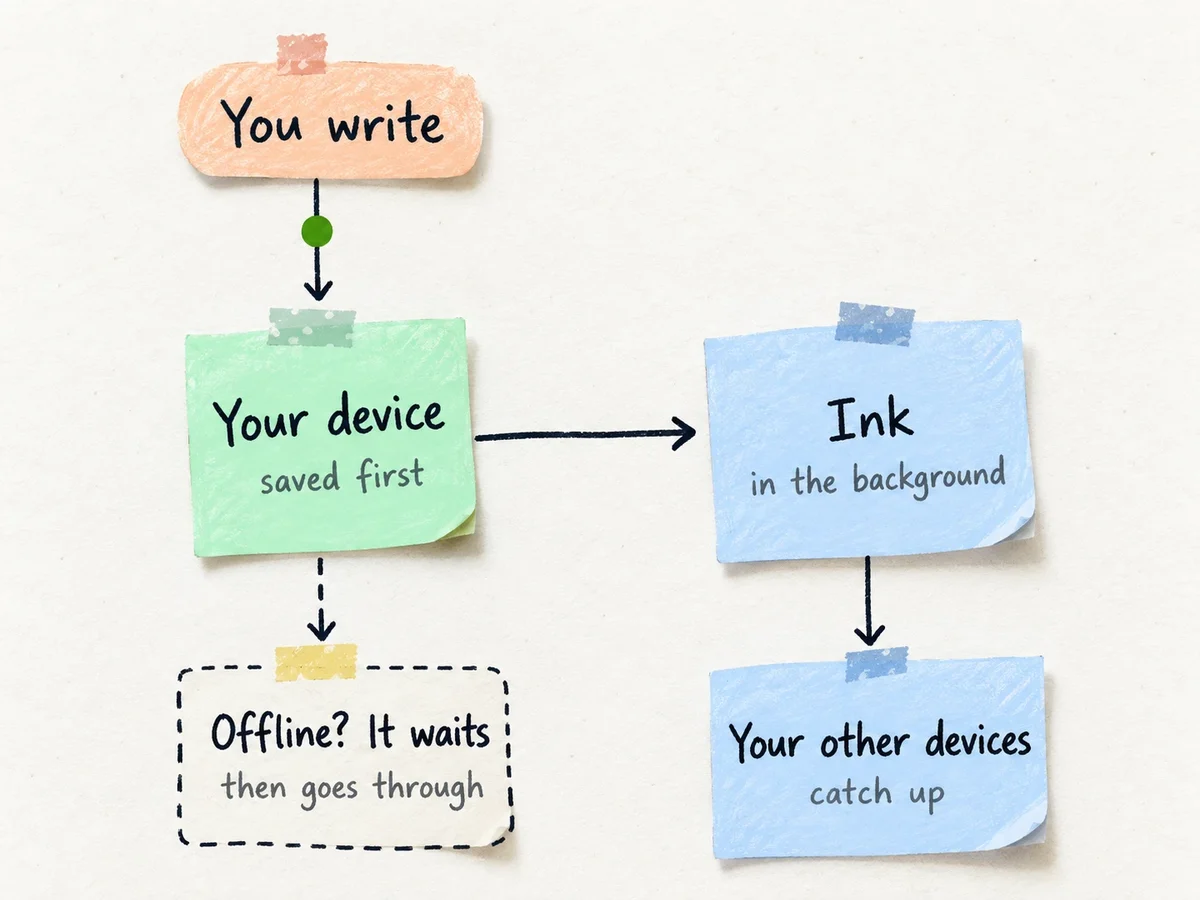
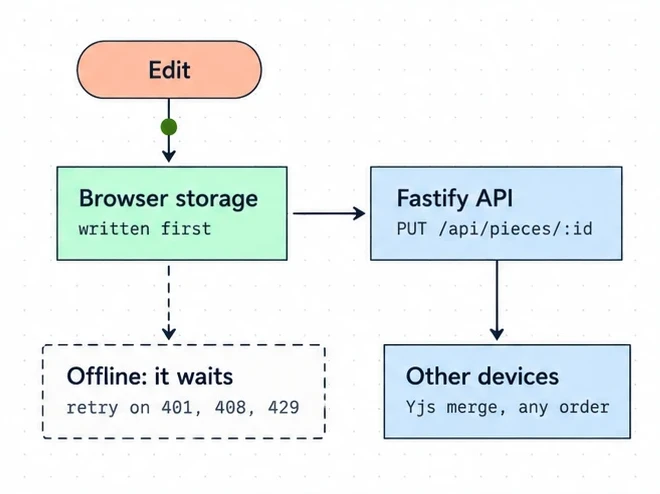
Every change is kept on your device first, then sent to Ink in the background. If your connection drops, nothing is lost: the change waits, and goes through when you are back.
Ink never reads your words while you type.
Each edit is first written to IndexedDB in the browser, then synced to the API in the background. Pieces are Yjs documents, so edits from two devices merge in any order, and a repeated sync changes nothing (pieces/merge.ts).
A 4xx answer is final for that change, except 401, 408 and 429, which retry. No model is called while you type: vectors are made after a save, off the request.
03
How Ink reads it.
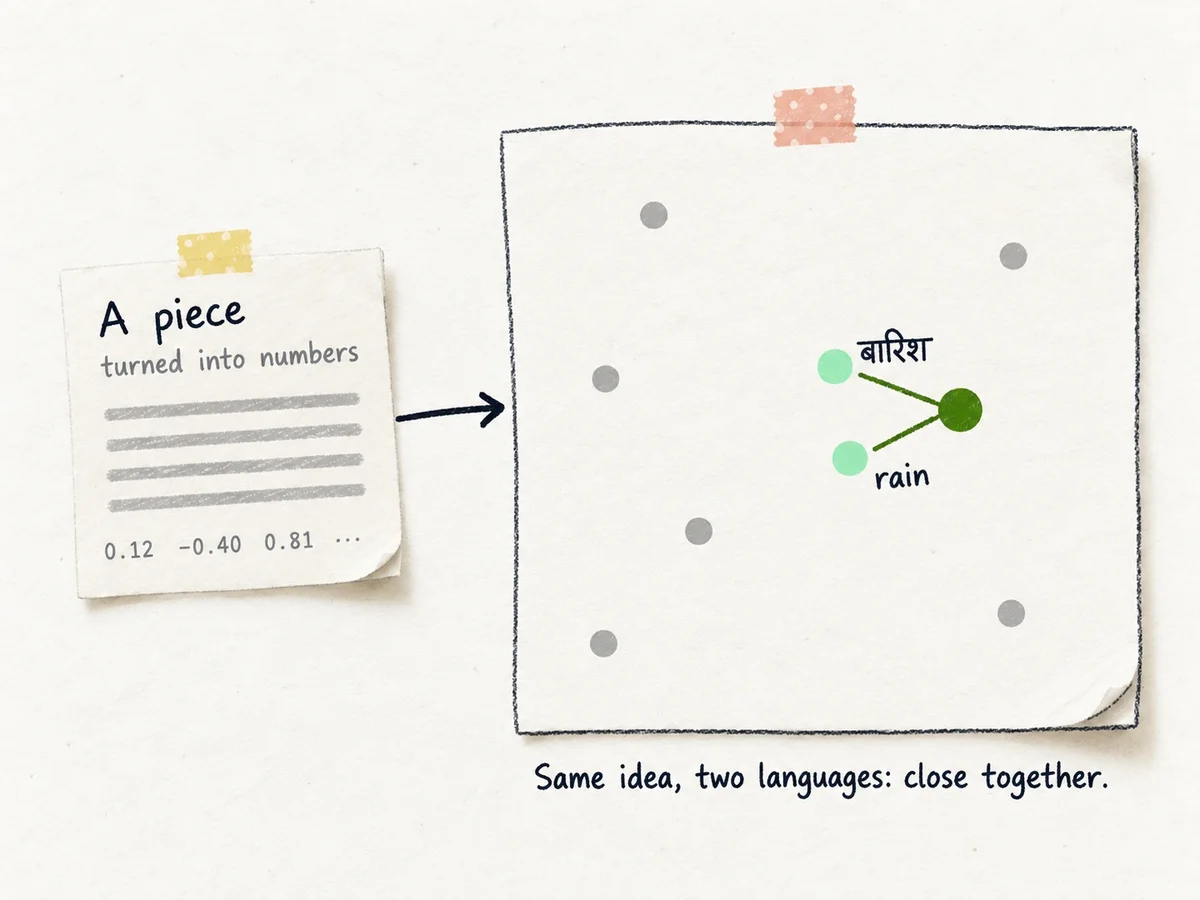
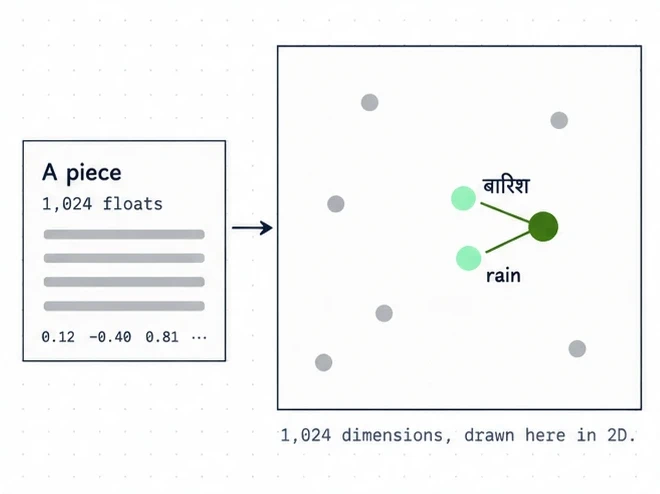
After you save, Ink reads the piece once, quietly, in the background. It turns the piece into a long list of numbers that stands for what it is about. Two pieces about the same thing end up close together, even when they use different words, or different languages.
The model that does this is open, and it runs on a computer Ink runs itself. Your writing is not sent to an outside company.
The model is BGE-M3 (open weights, 1,024 dimensions). It runs in apps/embedder, a small Python server on sentence-transformers, with the weights pinned to a commit and loaded from safetensors.
The API reaches it only on localhost, Tailscale, or a name in EMBEDDER_PRIVATE_HOSTS, with a shared secret and a 1 MB cap. Each copy handles one request at a time. A search waits at most 5 seconds for it, then shows words only.
Vectors live in Postgres next to the piece, per writer (pgvector, HNSW index, cosine), and are deleted with it.
04
Beside a piece.
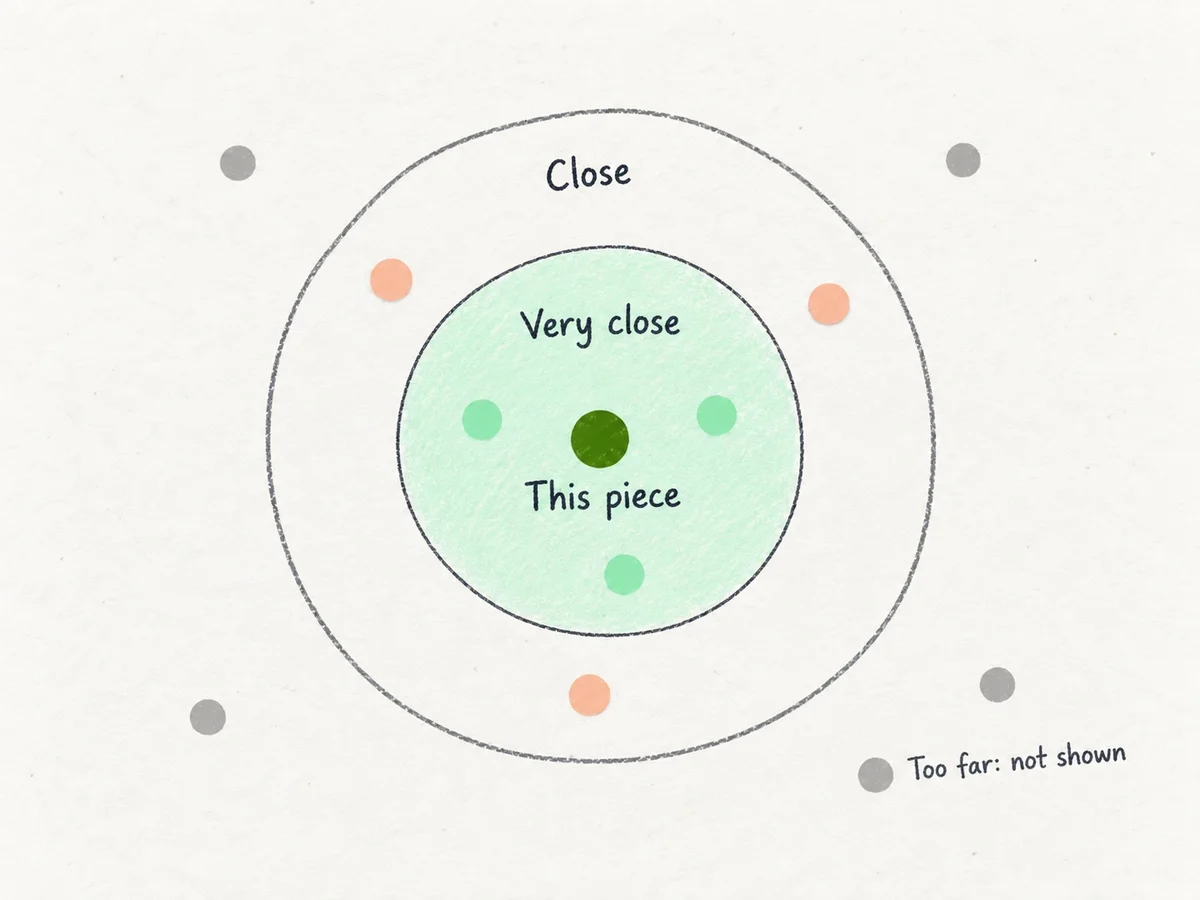
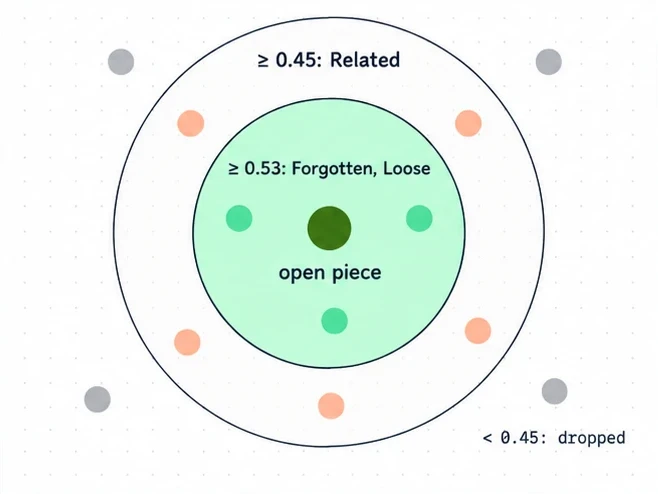
Open “Ink sees this too” next to a piece, and you may see these notes:
- Related. Other pieces of yours that are close in meaning to the one you are writing. Up to five.
- Forgotten. A piece you have not touched in six months or more, brought back. Up to two. Once shown, it rests for a month.
- Loose lines. A very short piece, a line or two, that belongs with this one. Up to two.
- Noticed. On All writing, one quiet remark: three pieces about the same thing, the same idea in Hindi and in English, or an old piece coming back. It is a fixed sentence, not something a model writes.
If nothing is close, Ink shows nothing. It never explains why two pieces are close.
Related ranks your pieces by cosine similarity to the open piece. Floor 0.45 (MIN_SIMILARITY), limit 5.
Forgotten and Loose use a stricter floor of 0.53 (MIN_SIDE_SIMILARITY), limit 2 each. Forgotten needs 180 days since the last edit and rests 30 days after it is shown. Loose is 160 characters or fewer.
Noise is dropped first: pieces under 3 words, near-copies, and repeats of the same words. The panel looks at your 1,000 most recent pieces and the 1,000 closest. A piece with no vector yet falls back to shared words.
Noticed (GET /api/noticed) has three kinds in order: three of the same thing, the same idea in Hindi and English, an old piece returns. Each is a fixed sentence pattern built on your device, never generated.
05
Search.
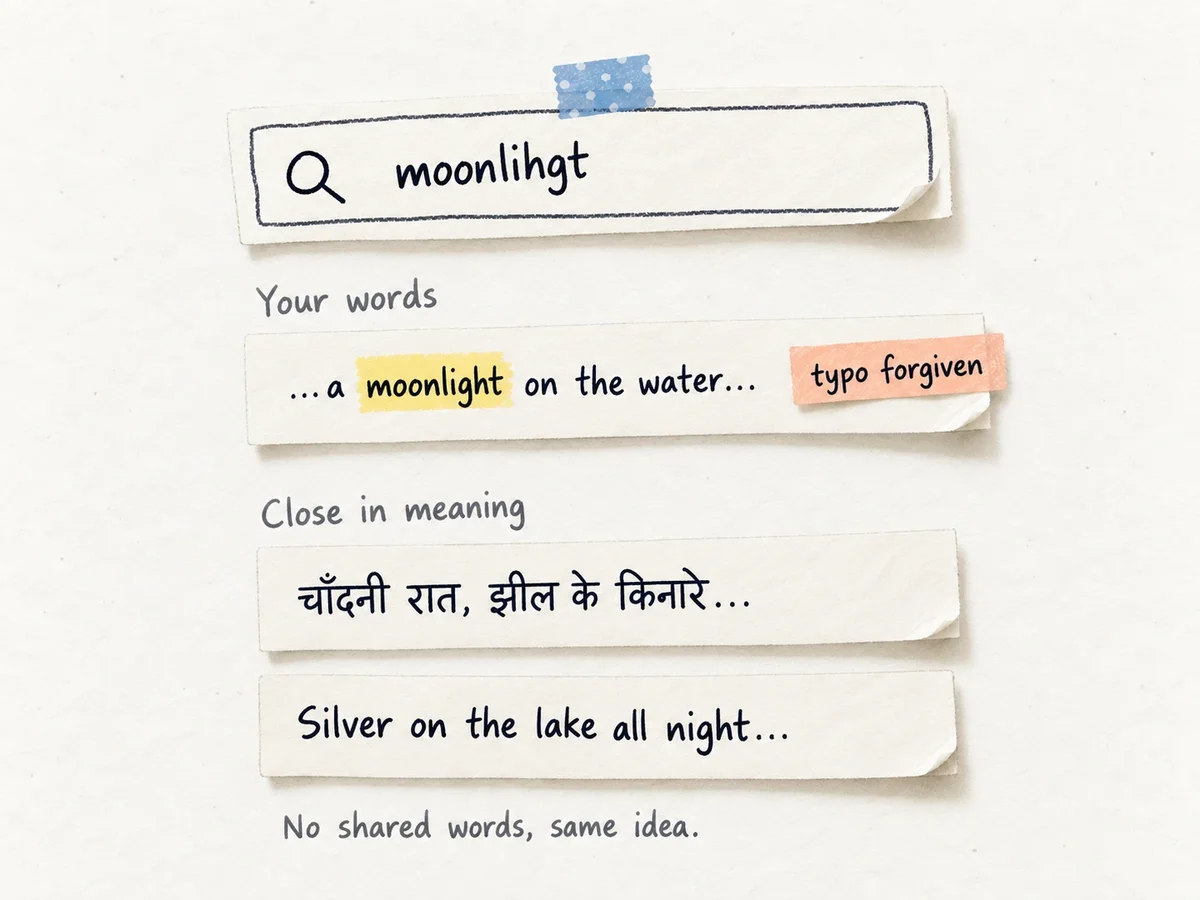
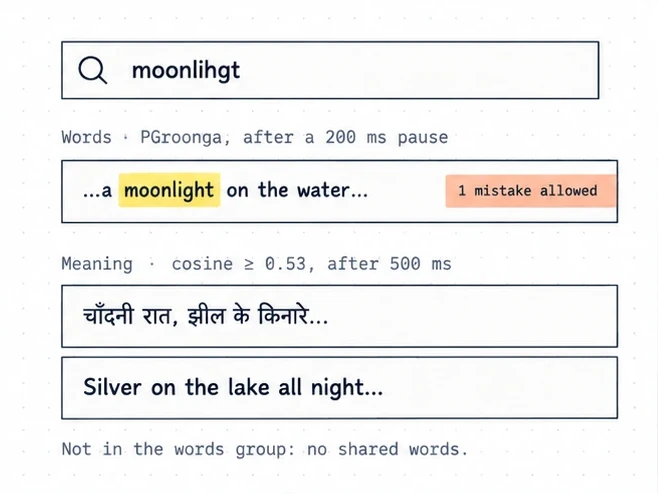
Press Cmd+K. Ink shows your words first: pieces that contain what you typed, even part of a word. Below that, “close in meaning”: pieces about the same thing, even when they do not use your words.
A small typo is forgiven. Hindi written in Latin letters has no standard spelling, so Ink treats common variants as the same. “baarish” and “barish” find the same piece, and they find बारिश too.
Words. PGroonga full-text search over a per-piece search copy, rewritten on every save. Every typed word must match, and part of a word counts. At most 12 words and 200 characters are read, and 20 results are returned.
Pieces that are not English also get a loose copy that folds aa/a, ee/i, oo/u, ph/f, w/v, z/j, sh/s and doubled letters. Devanagari is stored in Latin letters as well. English pieces skip it, because folding w into v would make “new” match “never”.
Typos. When exact words find nothing, one more pass over your 1,000 most recently edited pieces allows one mistake for words of 4 to 7 letters and two for 8 or more.
Meaning. The query is embedded and compared by cosine. Floor 0.53 (MIN_CLOSE_SIMILARITY), at most 5 results. Words wait for a 200 ms pause and meaning for 500 ms. One-word queries often score 0.45 to 0.5 against everything, so they show nothing instead of noise.
06
Why it feels fast.
Ink is built so that nothing you do waits for something else.
- Writing never waits for the internet. Every change lands on your device first, so a slow connection cannot slow you down.
- Nothing runs while you type. Ink reads your piece after you save, in the background, and only once you have gone quiet.
- Only the change is sent, not the whole piece.
- Search answers in two steps. Your words appear straight away. Pieces close in meaning follow a moment later, so you never wait for the clever part.
Meaning search can take a few seconds today. Your words never wait for it.
- Local first. The typing path ends at IndexedDB. There is no network round trip before the editor responds.
- Diffs, not documents. Sync sends
Y.diffUpdateagainst the server’s state vector, so only what the other side is missing moves. - No model on the request path. An embedding job is queued after a save and runs once the piece has been quiet (
EMBED_QUIET_SECONDS), so a burst of saves is one job. - Two search requests.
?part=words(PGroonga, after a 200 ms pause) renders at once.?part=close(HNSW, cosine, after 500 ms) follows. If the embedder is slow or down, the words still answer.
Meaning search takes about 3 seconds on a busy local model. The words request never waits for it.
07
What Ink never does.
- It never writes, rewrites, corrects or scores your writing.
- It never translates it. Your words stay in your own script.
- It has no streaks, goals or word-count pressure.
- It never uses your writing to train anyone’s models.
No model is called per keystroke, and no text is generated anywhere. Only open-weights models are used, and your writing is never sent to a third-party model API.
08
Honest limits.
- Hinglish, which is Hindi in Latin letters, is found by its words, not yet by meaning.
- Pieces under four words are left out of search by meaning.
- How close is “close” is tuned on small samples of writing, and will change as it is tuned.
- Search by meaning can take a few seconds. If it cannot answer, you still get your words.
- There is no phone app yet. Ink works in your phone’s browser.
Hinglish (hi-Latn) is left out of vectors and ranking, because BGE-M3 cannot read Latin-script Hindi. MIN_WORDS is 4 for search and 3 for the panel.
The cutoffs came from small samples and are due to be retuned. The embedder serves one request at a time, so search falls back to words after 5 seconds. Each writer may search 120 times a minute and open the panel 60 times a minute.
09
You stay in control.
Every piece has an “Ink remembers this” switch. Turn it off, and Ink leaves that piece out of Related, Forgotten, Loose lines, Noticed and search by meaning. You can still find it by its exact words, because that is only you searching your own writing. “Delete this piece” removes it for good. Ink keeps only its id, so an old device cannot bring it back.
Only you can read your writing.
Every query is scoped to the writer in the database. A CI job (api-checks) runs a two-writer privacy suite in Bruno on every pull request: writer B must never see, search, relate to or delete writer A’s pieces, and expired or broken tokens are refused.
Signing out ends API access at once, because each request checks auth.sessions. A deleted piece leaves only its id behind (deleted_pieces).
10
Read the code.
Everything described here is in the open. If you want to check any of it, read the code. Open it on GitHub
Source: github.com/NaveenKharwar/Ink. docs/search.md covers search in detail, with the name of the constant behind every number on this page.